

M2 Withdrawal helps members transfer available funds securely to their registered bank account.
Table of Contents
Why Choose M2 Withdrawal
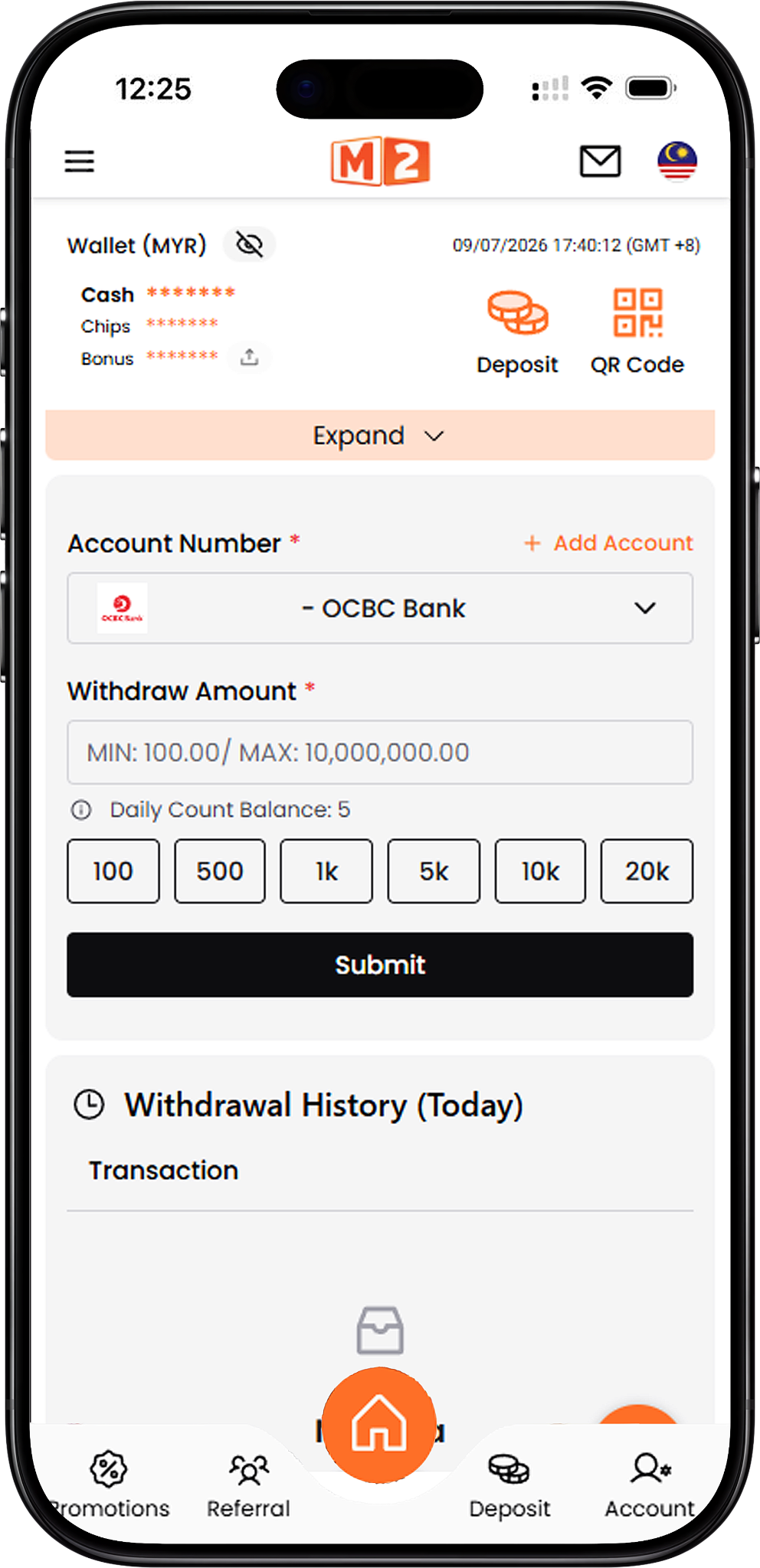
M2 Withdrawal offers a secure and straightforward payout process for eligible members. Once your account is verified, you can request withdrawals using your registered bank account while monitoring your transaction history. New members may complete Register, existing members can access Login, and users can install the platform through Download. The official website is m2myr.com.
Withdrawal Requirements
Registered Bank Account
Withdrawals should be made using a verified bank account registered under your member profile to help ensure secure transactions.
Available Wallet Balance
Ensure your account contains sufficient available funds before submitting a withdrawal request. Minimum and maximum withdrawal limits displayed on the withdrawal page should be observed.
M2 Withdrawal Steps
Step 1 — Log In to Your Account
Sign in through Login, then open the Withdrawal section from your account wallet.
Step 2 — Select Your Registered Bank Account
Choose your verified bank account from the available account list. If necessary, add and verify your banking information before requesting a withdrawal.
Step 3 — Enter the Withdrawal Amount
Input the amount you wish to withdraw while ensuring it falls within the displayed minimum and maximum withdrawal limits.
Step 4 — Review Your Withdrawal Request
Confirm your selected bank account and withdrawal amount before submitting the request to avoid unnecessary processing delays.
Step 5 — Submit the Withdrawal
Click the Submit button to send your withdrawal request for processing according to platform procedures.
Step 6 — Monitor Withdrawal History
Check your Withdrawal History to monitor the processing status and review completed transactions after submission.
Withdrawal Tips
Verify Your Banking Information
Make sure your registered bank account details are accurate before requesting a withdrawal to reduce the chance of delays or rejected transactions.
Review Withdrawal Limits
Always check the minimum withdrawal amount, maximum withdrawal amount, and any daily transaction limits shown on the withdrawal page before submitting your request.
Frequently Asked Questions
Which bank account should I use?
Withdrawals should be requested using your verified bank account that is registered with your member profile.
Can I review previous withdrawals?
Yes. Your Withdrawal History allows you to review submitted requests and monitor their processing status.
Where can I find additional account services?
Explore Deposit, Games, Promotions, Rebate, Agent, About Us, and Terms and Conditions for more platform information.
Withdraw Your Funds with Confidence
Submit your withdrawal request through your verified bank account, monitor your transaction history, and manage your funds securely with the M2 platform.